
Guide · updated July 2026
Airbnb Automation: What to Automate First (and What to Keep Human)
Airbnb automation in 2026: what to automate first (messaging, pricing, cleaning) and what to keep human — plus the tools that do it well.
If you're reading this at 11pm while typing the same Wi-Fi password to yet another guest, you already know the problem. Airbnb automation can handle the repetitive tasks that eat your evenings, but knowing where to start and what to leave alone is the difference between a smooth operation and a robotic guest experience that tanks your reviews.
Key Takeaways
The fastest wins in Airbnb automation come from five domains: guest messages, pricing, cleaning and turnover, self check-in, and reviews.
Automation tools should handle 80–90% of routine tasks. Airbnb automation can save up to 90% of routine task time when set up correctly.
Edge cases and emotionally charged situations (complaints, emergencies, damage disputes) must stay human.
A realistic stack for a 3-unit host in 2026 costs roughly $30 (prices checked July 2026)–$80/month and can be set up in a single weekend without writing a line of code.
Guests don't dislike automated messages if they are clear, warm, and well-timed. The copy-paste templates later in this article prove it.
The Essentials: What Airbnb Automation Really Means in 2026
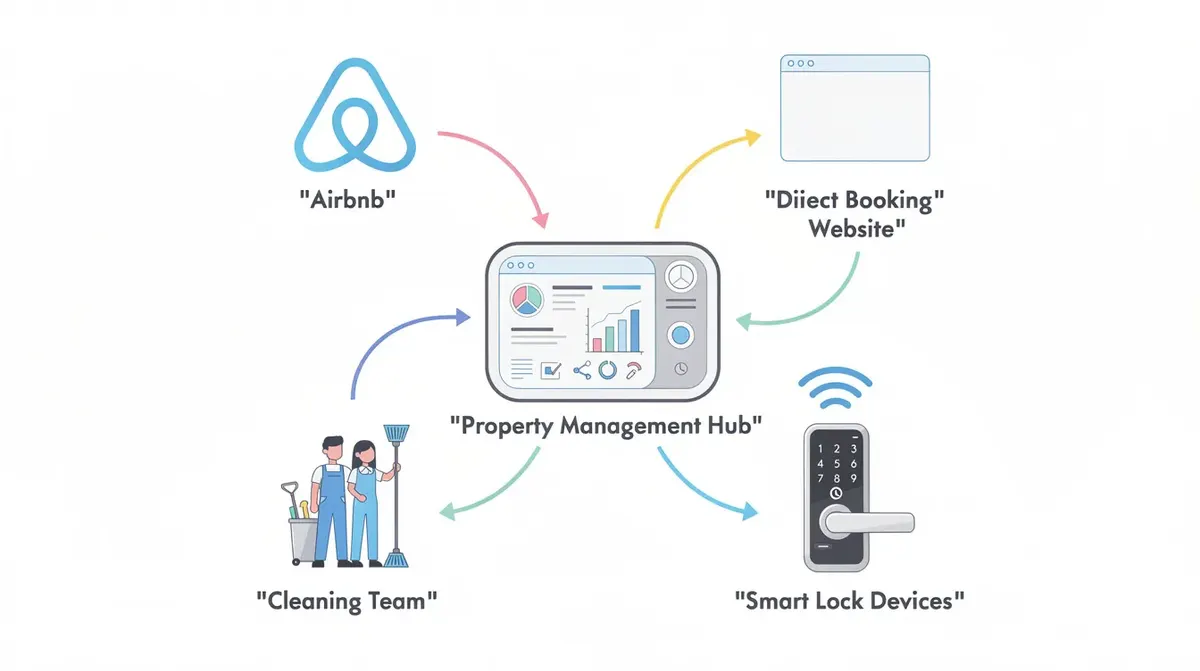
Airbnb automation means using software, rules, and smart devices to run day-to-day hosting without manual effort. It covers guest messaging, dynamic pricing, cleaning schedules, access codes, and review requests. Whether you own a single vacation rental or manage multiple properties across Airbnb, Booking.com, and a direct booking site, the same principles apply.
Think of it as "management by exception." Your property management system, channel manager, and automation software handle normal scenarios end to end. You step in only for unusual or emotional cases. Automation streamlines guest communication, pricing, and operational management while scalability allows hosts to manage multiple properties efficiently without overwhelming manual work. Automation can also reduce human error in booking calendars and scheduling tasks.
Here is how 2026-style hosting compares to the old way:
2018 Manual Hosting | 2026 Systemized Hosting | |
|---|---|---|
Messages | Copy-paste texts at midnight | Automated guest messaging via unified inbox |
Pricing | Flat rate, tweaked monthly | Dynamic pricing tools adjust rates daily |
Cleaning | Ad-hoc texts to cleaners | Calendar-synced task creation |
Access | Physical key handoff | Smart locks with per-booking codes |
Reviews | Forgotten half the time | Send automated review requests on schedule |
The rest of this article walks through each domain in order of impact, then shows a realistic automation stack, and finally covers what must stay human.
Automating Guest Communications: The Biggest Time Saver
Why Automate Guest Messaging?
Effective guest communication can consume up to 75% of a host's time. Most of that is answering the same questions about parking, Wi-Fi, and check-in instructions over and over. Automated guest messaging can save hosts 3-5 hours weekly, and 24/7 instant messaging improves guest ratings and satisfaction.
Message Sequence Overview
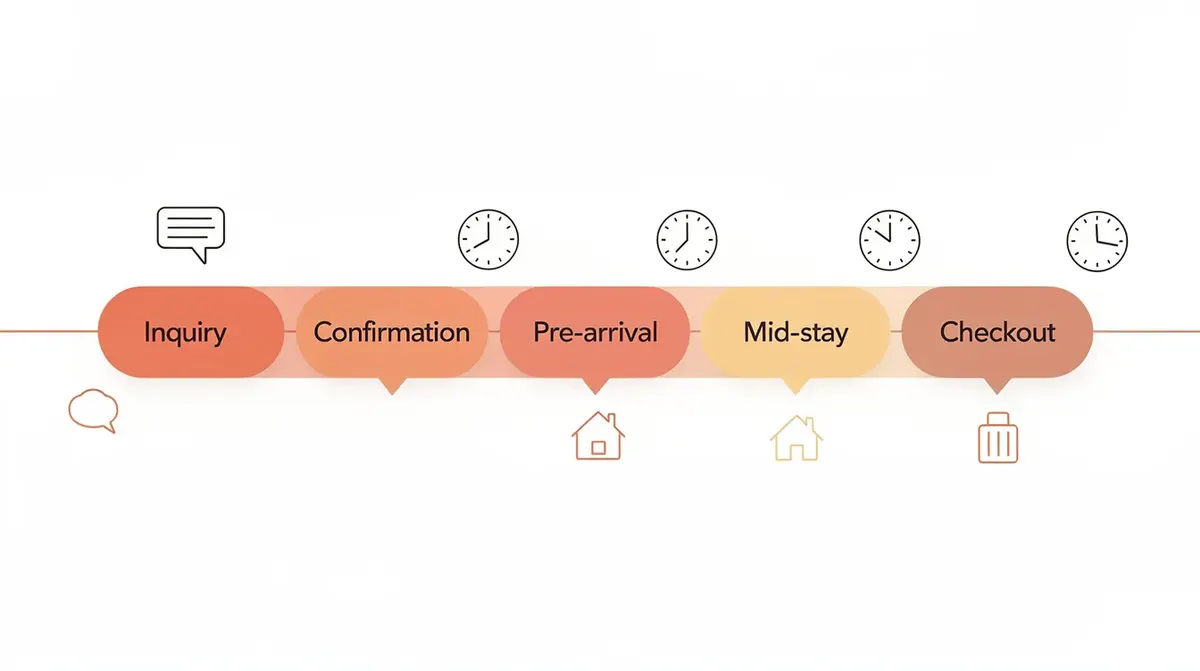
To automate Airbnb messages, you build a sequence of event-based messages inside a unified inbox or property management system:
Inquiry auto-reply (triggers instantly when a new message arrives)
Booking confirmation (triggers on reservation)
Pre-arrival with self check-in instructions (3 days before check-in dates)
Mid-stay check-up (morning after arrival)
Checkout + review request (evening before departure)
Using templates for guest messages can enhance communication efficiency and help maintain Superhost status on Airbnb. Automated guest messaging improves response rates and occupancy because you never miss a late-night guest inquiry again.
Sample Message Templates
Here is a warm, reusable inquiry reply:
Hi {{guest_first_name}}, thanks for your interest in {{listing_name}}! The dates you requested are available. Quick answers to the most common questions: free parking is included, Wi-Fi is fast and reliable, and downtown is a 10-minute walk. You can find our house rules in the listing description. We use self check-in Airbnb with a smart lock, so you'll get a unique door code before your trip. Let me know if you have any questions!
And a pre-arrival message sent 3 days before check-in:
Hi {{guest_first_name}}, your stay at {{listing_name}} is coming up! Here's everything you need: Address: [full address]. Door code: {{access_code}} (active from 3pm on {{check_in_date}}). Parking: [instructions]. Wi-Fi: Network "{{wifi_name}}", password "{{wifi_password}}". House rules + guidebook: [link]. Feel free to message me anytime if something comes up. See you soon!
Creating digital guidebooks reduces repetitive questions from guests by giving them essential property information in one place.
Centralizing Guest Communications
Tools from the best Airbnb management software category can centralize guest communications across Airbnb and a direct booking site, avoiding missed messages and keeping consistent communication across channels.
Message Templates You Can Reuse (Without Sounding Like a Robot)
Every template below should use guest names, mention the city or neighborhood, avoid jargon, and read at a 6th–8th grade level. Digital guidebooks provide guests with essential property information and cut down on back-and-forth messages.
New inquiry auto-reply: Confirm availability, answer top 2–3 questions (parking, Wi-Fi, distance to center), reinforce key house rules kindly. Tone: friendly, brief, ends with an invitation to ask more.
Booking confirmation: Thank the guest by name, restate exact check-in dates and guest count, link to house rules, and preview that detailed self check-in instructions will arrive 3 days before arrival.
Pre-arrival (self check-in Airbnb): Include precise address, smart lock code, parking instructions, Wi-Fi credentials, and a short guidebook link. Mention that the code activates at check-in time and expires at checkout.
Mid-stay check-up: Keep it to 2–3 sentences. Ask if Wi-Fi, hot water, and heating or AC are working well. Invite replies. Do not upsell or request a review mid-stay.
Checkout and review request: State exact checkout time, provide a simple task list (take out trash, load dishes, leave towels in tub), express gratitude, and politely ask for a review while promising to review the guest too.
Automating guest messaging can save hosts 3-5 hours weekly on these recurring tasks alone.
Dynamic Pricing: Letting Software Set Your Nightly Rates
Why Use Dynamic Pricing?
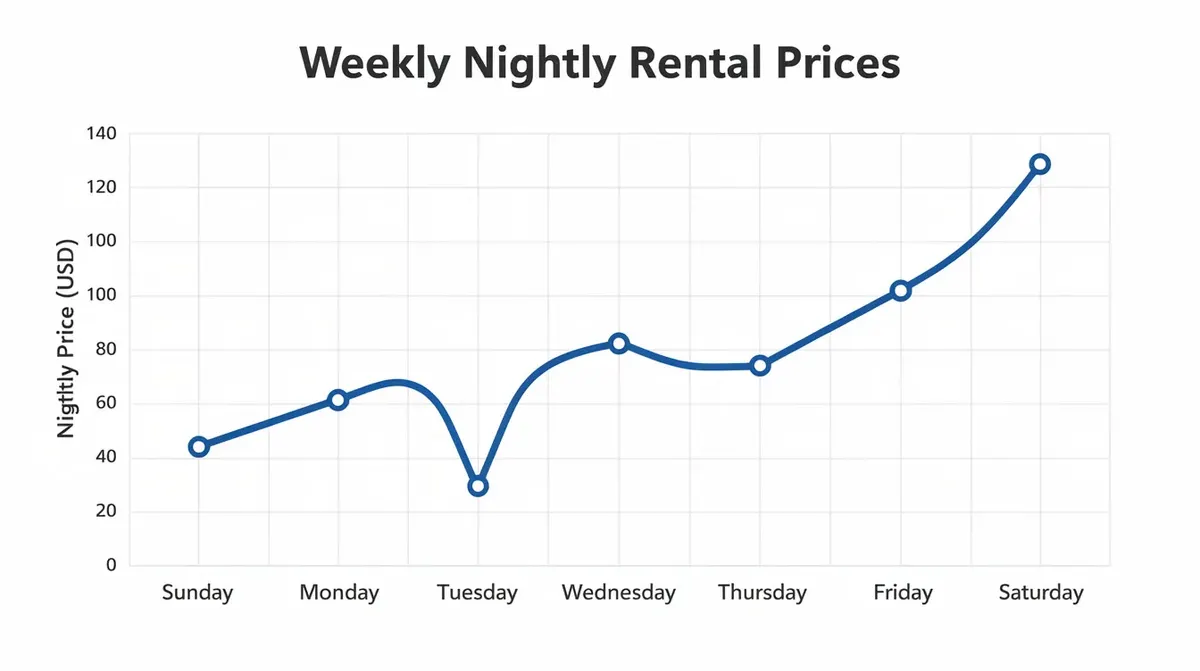
Setting nightly rates by gut feel leaves money on the table during high-demand weekends and local events, while overpricing slow midweek nights kills occupancy. Dynamic pricing tools adjust rates based on market demand, analyze competitor pricing and local events, and capture revenue you'd miss manually. PriceLabs can increase revenue by 20% through dynamic pricing, and a Hostaway study found that properties using dynamic pricing achieved a 25.1% increase in RevPAR and 28.6 percentage points higher occupancy.
Setting Up Dynamic Pricing
Connect the tool to your channel manager or property management system so it updates all channels at once. Channel management software updates pricing across all platforms simultaneously, eliminating rate mismatches.
Set a minimum price floor that covers your mortgage, cleaning service, and utilities. Set a maximum cap for peak periods.
Apply premiums for weekends (15–25%), holidays, and local events (25–50%).
Enable last-minute discounts: drop 10–20% for dates still unbooked within 5 days.
Review monthly: check occupancy trends and competitor pricing, then adjust your base price.
Example of Dynamic Pricing in Action
A 2-bed apartment in Austin in March 2026 might have a base rate of $150. During SXSW, dynamic pricing pushes it to $275. Midweek in January, it drops to $110 to fill gaps. Dynamic pricing tools can boost revenue by adjusting rates automatically, and they save hosts 3-5 hours weekly on manual tasks. Tools that combine dynamic pricing with rules can also push direct bookings slightly cheaper than OTAs to maximize revenue on your direct booking website.
Cleaning and Turnover Automation: Never Miss a Same-Day Flip
Why Automate Cleaning and Turnover?
A missed turnover is the fastest path to a 1-star review. Automating cleaning management ensures a spotless property for every check-in. Cleaning apps can sync directly with your Airbnb calendar so that every new booking automatically creates a cleaning task. Automated cleaning scheduling reduces manual coordination efforts and can save hosts 3-5 hours weekly on management tasks.
Automated Cleaning Task Workflow
Auto-create tasks: When a reservation is confirmed or modified, the system generates a cleaning job with dates, guest count, and property details.
Send reminders: Notify cleaners 24 hours before checkout and again on the morning of turnover.
Detailed checklists: Include linens, towels, consumables (toilet paper, coffee, dish soap), and a step for photo documentation. Automated cleaning tools provide notifications and photo proof of completed tasks.
Priority rule example: "If checkout is before 11:00 and next check-in after 16:00 on the same day, mark as priority same-day turnover and alert backup cleaner if primary doesn't accept within 30 minutes."
Once you manage 3+ units or list on multiple listings across channels, automated cleaning coordination prevents double-booked cleaners and missed turnovers. Good short term rental management software lets cleaners access only the information they need (dates, tasks, notes) without exposing guest data or pricing.
Self Check-in and Smart Devices: Automating Access Without Losing Control
Why Use Self Check-in and Smart Devices?
Self check-in Airbnb is no longer a perk; it is expected. Late arrivals, flight delays, and contactless preferences make it the default. Smart home technology includes smart locks and thermostats for contactless check-in. Smart locks eliminate the need for in-person key exchanges and provide unique access codes for each guest stay.
Setting Up Smart Devices and Access Automation
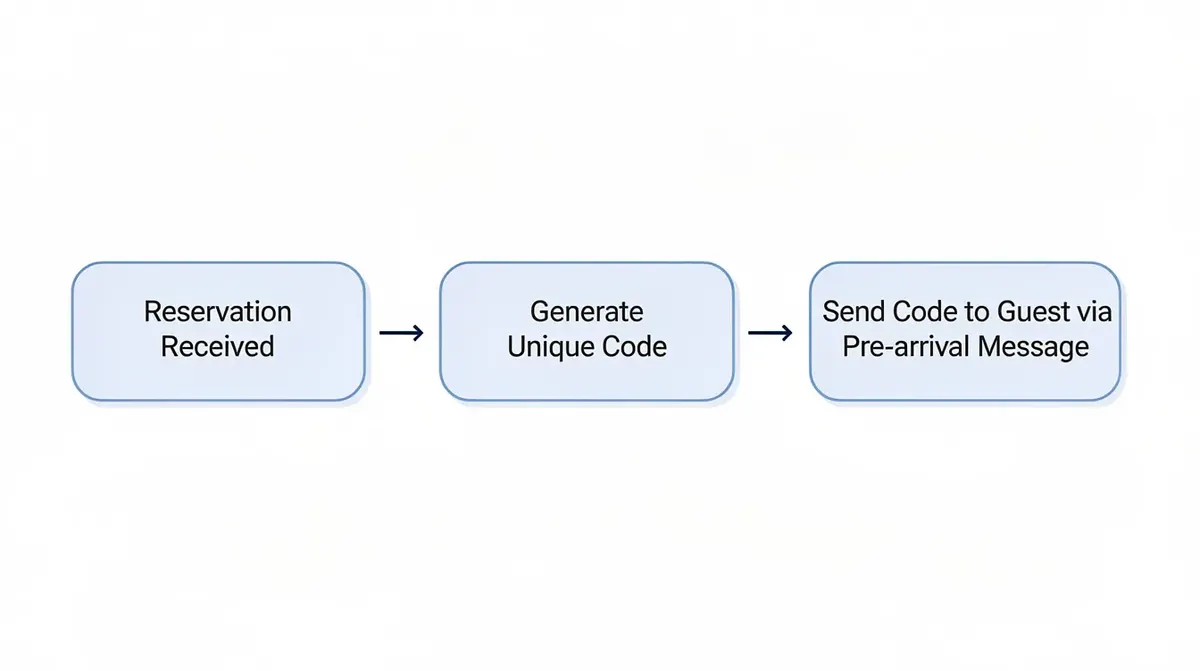
Hardware: Devices like Yale Assure Lock 2 or Schlage Encode Plus integrate with your property management system so each booking gets a unique, time-limited code. Smart locks enable contactless check-ins for guests and enhance guest security and allow self-check-ins.
Automation rule: Generate a door code that activates at 15:00 on check-in dates and expires at 11:30 on checkout date. The code is sent automatically inside your pre-arrival message.
Smart thermostats save energy by adjusting temperatures automatically, setting eco mode when the property is vacant and returning to a comfortable setting before arrival. Smart devices enhance guest comfort and security in rentals.
Noise monitoring devices alert hosts when noise levels exceed limits, helping enforce house rules on quiet hours. Keep monitoring audio-free and disclose all smart devices in the Airbnb listing to comply with privacy regulations.
Automating Reviews and Post-Stay Follow-up
Why Automate Reviews?
Guest reviews directly affect your Airbnb listing's search ranking and future bookings. Hosts can reply to guest reviews within 14 days after checkout, and consistently doing so encourages reciprocity. Automated review requests can increase positive reviews by 35%.
Review Automation Workflow
Set up rotating review templates that pull in the guest's first name and trip length. Example: "Thanks for staying with us, {{guest_first_name}}! You left the apartment in great shape and were easy to communicate with. Hope to host you again." Hospitable automates 5-star reviews using review templates, and AI can suggest replies to guest reviews based on tone.
Vary phrasing across 4–5 templates so reviews don't look identical. Keep them short, honest, and free of private details.
Post-stay follow-up for direct bookings: Thank the guest, share a discount code for a future stay on your direct booking site, and invite them to join an email list for local updates.
Pause automation for problem stays so you can leave a careful, manual review or choose not to review at all. Automated review management simplifies handling multiple properties without losing control.
A Realistic Airbnb Automation Stack for a 3-Unit Host
Meet Alex, a property manager in Denver managing 3 apartments since 2022 while working full-time. Here is Alex's stack:
Layer | Tool Category | Monthly Cost (approx.) |
|---|---|---|
PMS + channel manager | All in one solution (e.g., Hostaway or Hospitable) | $40–$120 |
Dynamic pricing | PriceLabs or similar | $20–$60 |
Cleaning coordination | Turno or Automatebnb ($5/property) | $15 |
Smart locks | Yale Assure Lock 2 (one-time hardware) | $0 recurring |
AI messaging layer | Built into PMS or standalone | $0–$30 |
Channel managers sync calendars across multiple booking platforms, and Hospitable has native API connections with major booking channels. Using a channel manager can save 3-5 hours weekly on manual tasks. Automating listings prevents double bookings and overbooking issues, and automation tools can eliminate double bookings through calendar synchronization.
A typical booking lifecycle:
Guest books on Airbnb
PMS syncs to direct booking site calendar
Welcome sequence starts
Smart lock code gets generated
Cleaning task is created
Post-stay review and automatic review requests send automatically
Alex now spends 1–2 hours per week reviewing flagged messages, tweaking pricing rules monthly, and handling exceptions like maintenance. Before automation, Alex spent 2–3 hours per day, often on weekend evenings. When Alex adds a 4th Airbnb property, almost no extra admin time is needed because the automation rules already exist. This is what it means to simplify operations and streamline operations for a vacation rental business.
What NOT to Automate: Moments That Should Stay Human
Hospitality is still a people business. Here is where a human makes the difference:
Serious complaints about cleanliness, safety, or a family emergency. These need a personal call or custom message, not a canned response. A seamless guest experience depends on knowing when to step in.
Damage disputes and refunds: Set up alerts so you are notified and can review each case personally. Never automate a rigid "no refund" reply.
Custom stays: 30+ night bookings, events, or film shoots require bespoke pricing and agreements that standard dynamic pricing rules can't handle.
Over-automating marketing: Respect consent, cap frequency, and add real value (local news, curated local events) rather than constant discounts to past Airbnb guests.
Template review: Every 3–6 months, re-read your automated messages. Neighborhood rules change, property details shift, and your hosting style evolves.
Property owners who deliver exceptional guest experiences know that guest experience software handles the routine while human judgment handles the rest.
Common Automation Mistakes (and How to Avoid Them)
Cold, generic templates: Always use guest names and reference property details. Rewrite in simple, friendly language at a conversational reading level.
Automating everything at once: Start with guest messaging automation and cleaning schedules. Add dynamic pricing and smart devices once the basics are stable.
No human backup: Name a local contact or virtual assistant for emergencies and include their number in key messages. Guest management still needs a safety net.
Ignoring regulations: Comply with Airbnb's terms and local short term rental laws when using third-party Airbnb automation tools. Disclose all smart devices.
Not measuring results: Track occupancy trends and average daily rate before and after automation. A simple ROI check: (hours saved × your hourly value) minus tool cost. Payment processing fees and tool subscriptions should be factored in.
Getting Started: A 7-Day Airbnb Automation Rollout Plan
Day 1–2: Choose and connect a property management system with a unified inbox to Airbnb (and any existing direct booking site). Import your Airbnb listing data, sync calendars, and verify no double bookings exist. Calendar syncing is the foundation.
Day 3: Set up core automated message templates (inquiry reply, booking confirmation, pre-arrival, mid-stay, checkout and review request). Test them on a dummy reservation. Send check-in instructions to yourself to verify formatting.
Day 4: Connect or configure dynamic pricing. Set base, minimum, and maximum nightly rates. Review suggested rates for the next 60 days and adjust for any upcoming local events.
Day 5: Onboard your cleaning service to the system. Create turnover checklists and confirm that new test bookings create tasks as expected.
Day 6: Install or connect smart locks and thermostats. Create automation rules for self check-in and vacancy energy savings. Test access codes.
Day 7: Review all automations, add safeguards (notifications for last-minute bookings or long stays), and switch from manual to automated workflows.
You just eliminated the most time-consuming tasks in your short term rental business in one week. Airbnb hosts who follow this plan save time immediately and start to maximize revenue within the first month.